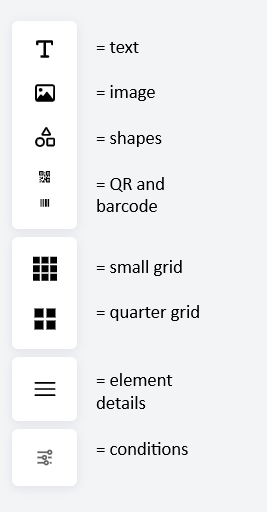
Design editor tools
This page is for Product Documentation.
Editor tools
| Tool | Function |
| Text | Add static text or insert dynamic fields using the field picker. |
| Images | Insert images such as logos, banners, and backgrounds. |
| Shapes | Add graphical elements such as rectangles and lines. |
| QR codes and barcodes | Add scannable content and configure its value. |
| Small grid | Display small grid squares to help align elements. |
| Quarter grid | Divide the canvas into four sections with horizontal and vertical lines. |
| Element details | Inspect and select elements using their positions and dimensions. |
| Conditions | Setup conditions for one element that determines when it is displayed and when it is hidden |
| Save | Save the design changes. |