Typical configuration of POS for Restaurant
The following values represent the typical configuration of POS for Restaurant.
This page is for Product Documentation.
The following values represent the typical configuration of POS for Restaurant:
| POS Menu Button | POS Action Type / Action Code | Parameters |
|---|---|---|
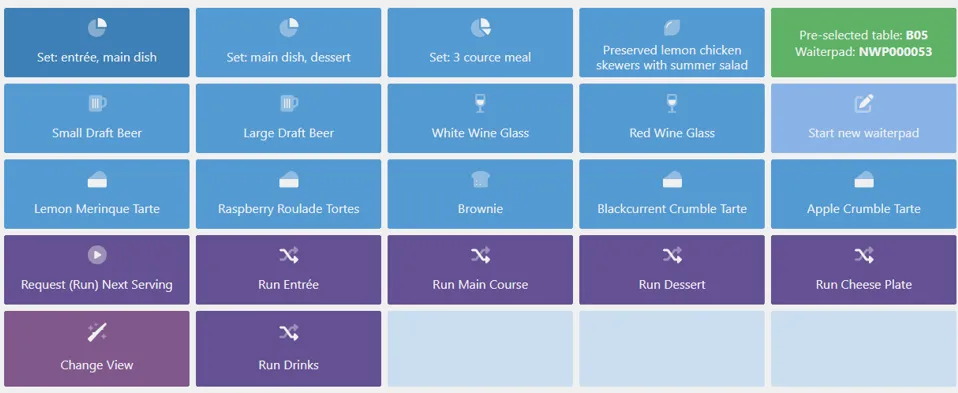
| Set Menus | Item/Item No | Not Applicable |
| Waiter Pad | SHOW_WAITER_PAD | Seating Selection Method = List Show Only Active Waiterpad = false It will display status of current waiter pad. > Note: Note on syntax for button, using BUILTIN_SALE: (Pre-selected table: {{NPRE.TableNo}} Waiterpad: {{NPRE.WaiterPadNo}}). |
| Start New Waiter Pad | NEW_WAITER_PAD | Ask for Number of Guest = true Seating Selection Method = List Open Waiter Pad = false Use seating from context = false |
| Request (Run) Next Serving | RUN_W/PAD_ACTION | Lines to Send to Kitchen = New/Updated Move Sale to W/Pad on Finish = true Return to Default View on Finish = true Serving Step to Request = BLANK Waiter Pad Action = Request Next Serving |
| Run Drinks | RUN_W/PAD_ACTION | Lines to Send to Kitchen = New/Updated Move Sale to W/Pad on Finish = true Return to Default View on Finish = true Serving Step to Request = DRINKS Waiter Pad Action = Request Specific Serving |
| Run ENTREE | RUN_W/PAD_ACTION | Lines to Send to Kitchen = New/Updated Move Sale to W/Pad on Finish = true Return to Default View on Finish = true Serving Step to Request = ENTRÉE Waiter Pad Action = Request Specific Serving |
| Run Main Course | RUN_W/PAD_ACTION | Lines to Send to Kitchen = New/Updated Move Sale to W/Pad on Finish = true Return to Default View on Finish = true Serving Step to Request = MAIN Waiter Pad Action = Request Specific Serving |
| Run Dessert | RUN_W/PAD_ACTION | Lines to Send to Kitchen = New/Updated Move Sale to W/Pad on Finish = true Return to Default View on Finish = true Serving Step to Request = DESSERT Waiter Pad Action = Request Specific Serving |
| Run Cheese Plate | RUN_W/PAD_ACTION | Lines to Send to Kitchen = New/Updated Move Sale to W/Pad on Finish = true Return to Default View on Finish = true Serving Step to Request = CHEESE Waiter Pad Action = Request Specific Serving |
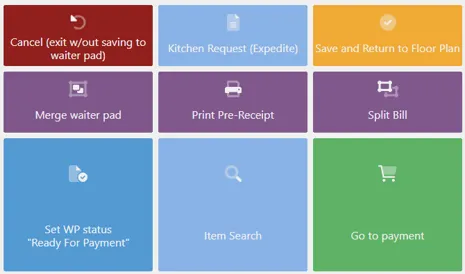
| Cancel (exit w/out saving to waiter pad) | RUN_W/PAD_ACTION | Lines to Send to Kitchen = New/Updated Move Sale to W/Pad on Finish = true Return to Default View on Finish = true Serving Step to Request = BLANK Waiter Pad Action = Close w/out Saving |
| Merge waiter pad | RUN_W/PAD_ACTION | Lines to Send to Kitchen = New/Updated Move Sale to W/Pad on Finish = true Return to Default View on Finish = true Serving Step to Request = BLANK Waiter Pad Action = Merge Waiter Pad |
| Kitchen Request (Expedite) | RV_K/REQUESTS | Filter by = Waiterpad |
| Print Pre-Receipt | RUN_W/PAD_ACTION | Lines to Send to Kitchen = New/Updated Move Sale to W/Pad on Finish = true Return to Default View on Finish = true Serving Step to Request = BLANK Waiter Pad Action = Print Pre-Receipt |
| Save and Return to Floor Plan | RV_SET_R-VIEW | Use Default End Of Sale View = true |
| Split Bill | SPLIT_BILL | All Waiter Pads = Yes Seating Selection Method = stringPad Return to Default View on Finish = false |
| Set WP status “Ready For Payment” | RV_SET_W/PAD_STATUS | Status Code = PMT Waiter Pad Code = BLANK |