
Set up integration with Planet
Planet provides payment and technology solutions for Retail and Hospitality solutions worldwide. To set up integration with Planet in NP Retail, follow the steps provided in this article.
Planet provides payment and technology solutions for Retail and Hospitality solutions worldwide. To set up integration with Planet in NP Retail, follow the provided steps:
- Search for EFT Setup, and select the related link.
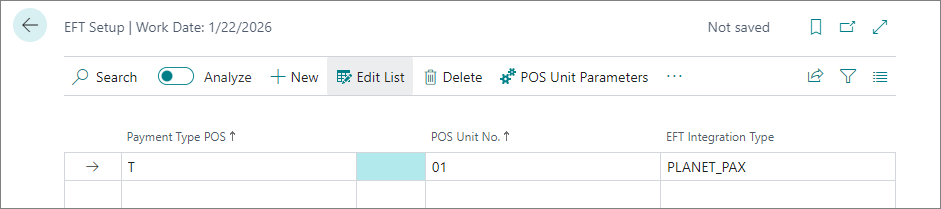
- Add a new line with the Payment Type POS set to T (Cash), select the desired POS Unit to be affected by the integration, and choose PLANET_PAX as the EFT Integration Type.
- Open the Payment Type Parameters, and make sure the Log Level is set to Error.
- Close the Planet Pax Integration Configuration pop-up window.
- Open the POS Unit Parameters.
The Planet PAX Terminal Configurations page is displayed. - Create a new record, and provide the necessary information:
- POS Unit No. - The unique number used for identifying a POS unit affected by the integration.
- Terminal ID - This ID should be displayed on the terminal device you’re setting up. This information is typically provided at the same time the terminal is provided.
- Location ID - This ID should be displayed on the terminal device you’re setting up. This information is typically provided at the same time the terminal is provided.
- URL Endpoint - This URL is provided by Planet. It is the Cloud Endpoint the POS sends a request to, which in turn connects to the terminal.