
Privacy consent customization
It’s possible to additionally customize the Privacy Consent pop-up window via certain options in Magento Webadmin.
By default there are two consent segments that make up the Privacy Consent box - general and membership. However, it’s possible to add additional consent types that end-users need to agree to, to proceed with registration.
In Magento Webadmin, there’s a Blocks administrative section (Content>Blocks) with two CMS blocks that correspond to the default consent solutions:
-
gdpr_option_label_<lowercased-type> - agreement label for the consent type;
-
gdpr_option_info_<lowercased-type> - info block displayed above the agreement label.
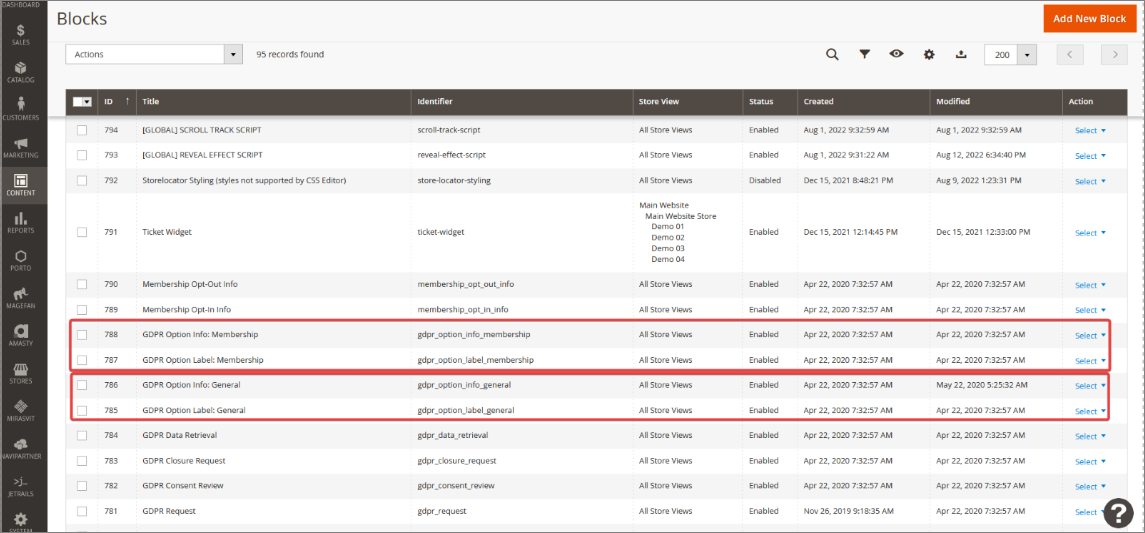
The text displayed in Privacy Consent window can be customized by choosing the gdpr_option_info_< > block, and clicking Select > Edit.
Note: All other GDPR blocks are also customizable (gdpr_data_retrieval, gdpr_closure_request, gdpr_consent_review etc.).
Additional consent types
In Magento Webadmin, there’s an administrative section NaviPartner > GDPR > Settings, that contains the Consent panel. Inside, you can set up Additional Consent Types.
When adding a new consent type, you need to provide the Consent Type Code first, and then in the Action field choose what will happen when a customer accepts/declines the GDPR terms.
If the Opt-out of Membership on decline option is set to Yes, the customer’s membership will be terminated when they decline the privacy consent terms.
Advanced consent settings
The Consent Advanced panel is located immediately below the base Consent panel. You can switch its Allow Configuration Overrides option to Yes to be able to add advanced custom options that users will have access to only if they’ve accepted the GDPR privacy consent terms.
Notifications for requests
The Notifications for Requests panel is used for setting up notifications for active GDPR requests. The following fields and options are available:
CRON
The following fields and options are available in the CRON panel: