
Create a stock-take worksheet and worksheet lines
Create a stock-take worksheet and worksheet lines
Refer to this article to learn how to create a stock-take worksheet and the accompanying worksheet lines.
Worksheets represent logical blocks of work during stock-takes. To create a stock-take worksheet, and the accompanying worksheet lines, follow the provided steps:
Prerequisites
Procedure
-
Search for Stock-Take Configurations, and choose the related link.
-
Select a stock-take configuration line from the list, and click Worksheets in the Related dropdown list.
-
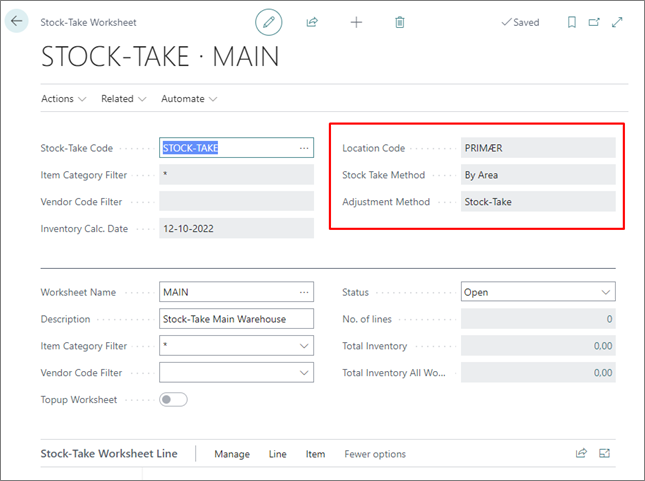
Populate the necessary fields.
Note: When working with worksheets, it’s important to understand how they will interact with one another, and how the counted numbers will be applied. Vital information is displayed in the fields such as Location Code, Stock Take Method, and Adjustment Method. The configuration associated with this stock-take will contain more information about specific properties of the values provided in these fields.
-
Either enter the inventory count manually or import from a file. Refer to the following tables for descriptions of the relevant Stock-Take Worksheet Line fields:
Manual entry
Import from file
If this approach is selected, you need to select the import method, and the file which will serve as a source of stock-take data.
Note: If lines contain bold entries, that means that there’s something wrong with them. If that’s the case, you need to correct the issue before proceeding.
Next steps
- Once the worksheet has been completed and corrected, you need to transfer it to the Item Journal, and post it.