
Set up Quickpay payment integration
To set up the Quickpay online payment gateway integration in Business Central, make sure that prerequisites are met and follow the provided steps.
Prerequisites
-
Acquire a merchant account.
To use Quickpay, you first need to register a merchant account. The merchant account can either be obtained through NaviPartner or you can create it on your own. -
Obtain an API key.
An API key needs to be procured before any interaction between Business Central and Quickpay can occur. The key can be obtained in the Quickpay Manager. -
Ensure that the user associated with the API key has at least the same permissions as the Api User system user. This can be achieved by using the Use template functionality in Quickpay.
Procedure
-
Search for Payment Gateways, and select the related link.
-
Click New to create a code for QuickPay.
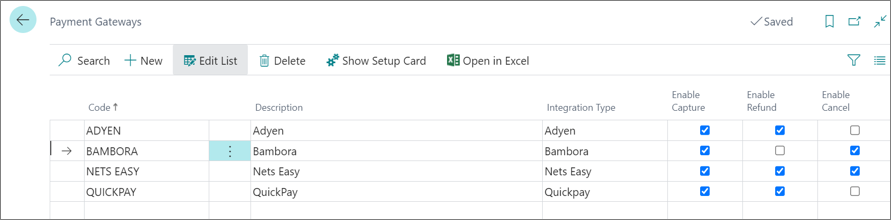
Note: Depending on the required setup, the options to Enable Capture, Refund and Cancel need to be flagged as illustrated in the provided screenshot.
-
Click Show Setup Card and update the API Password field with the key you’ve previously obtained as a prerequiste.
-
Verify the connectivity with Quickpay using the Test Connection action.