
Set up POS Named Action Profile
POS Named Action Profile is a necessary setup component for having fully operational POS units.
To ensure you have a fully operational POS unit, certain actions need to be set correctly. This is done with the POS Named Actions profile.
Follow the provided steps to set all actions that need to be set in order to set the POS Named Action Profile.
- Search for POS Actions Profiles and choose the related link.
- Create New.
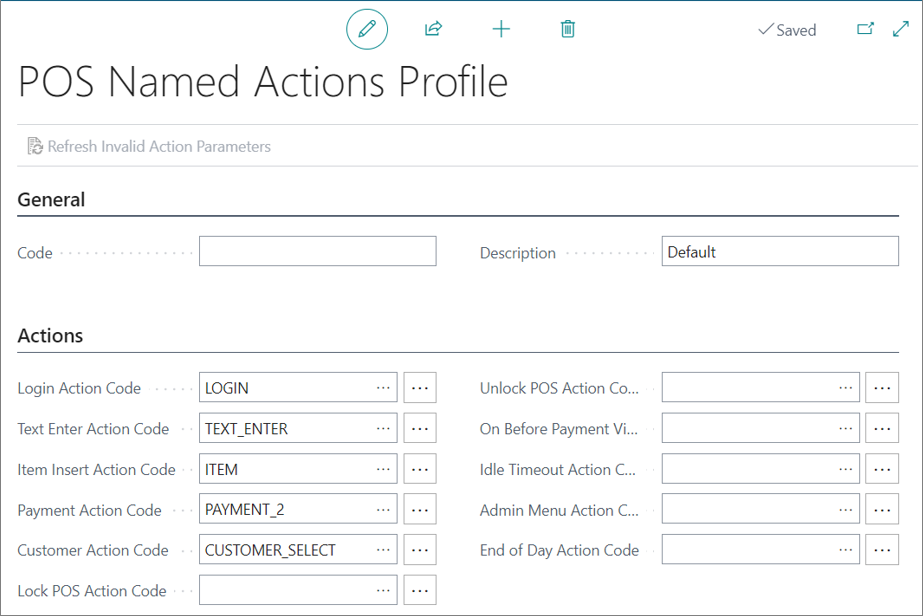
The POS Named Actions Profile window is displayed. - Type in the code in the General section.
- Populate the fields in the Actions section with the correct actions:
Next steps
Add the POS Named Action Profile to the POS Unit
After setting up the POS Named Actions Profile, you need to add it to the POS Unit.
-
Search for POS Unit list and choose the related link.
-
Open the POS Unit Card.
-
Provide the prepared POS profile in the POS Named Action Profile field.