> This page is for Product Documentation.
> For clean Markdown of any page, append .md to the page URL.
> For a complete documentation index, see https://docs.navipartner.com/llms.txt.
> For AI client integration (Claude Code, Cursor, etc.), connect to the MCP server at https://docs.navipartner.com/_mcp/server.
# CS UI structure
> The **CS UI Structure** administrative section contains the current app layout and hierarchy of CS UIs organized in a single table. All changes you make here will be reflected in the menu of the mobile device.
> **Note:** From here, you can also modify the individual CS UI setup by selecting a CS UI code from the table, and then clicking **CS UI** in the ribbon.
All CS UIs applied to the structure are interconnected via the **Next UI** fields which can be seen when modifying all of the CS UIs from the list.
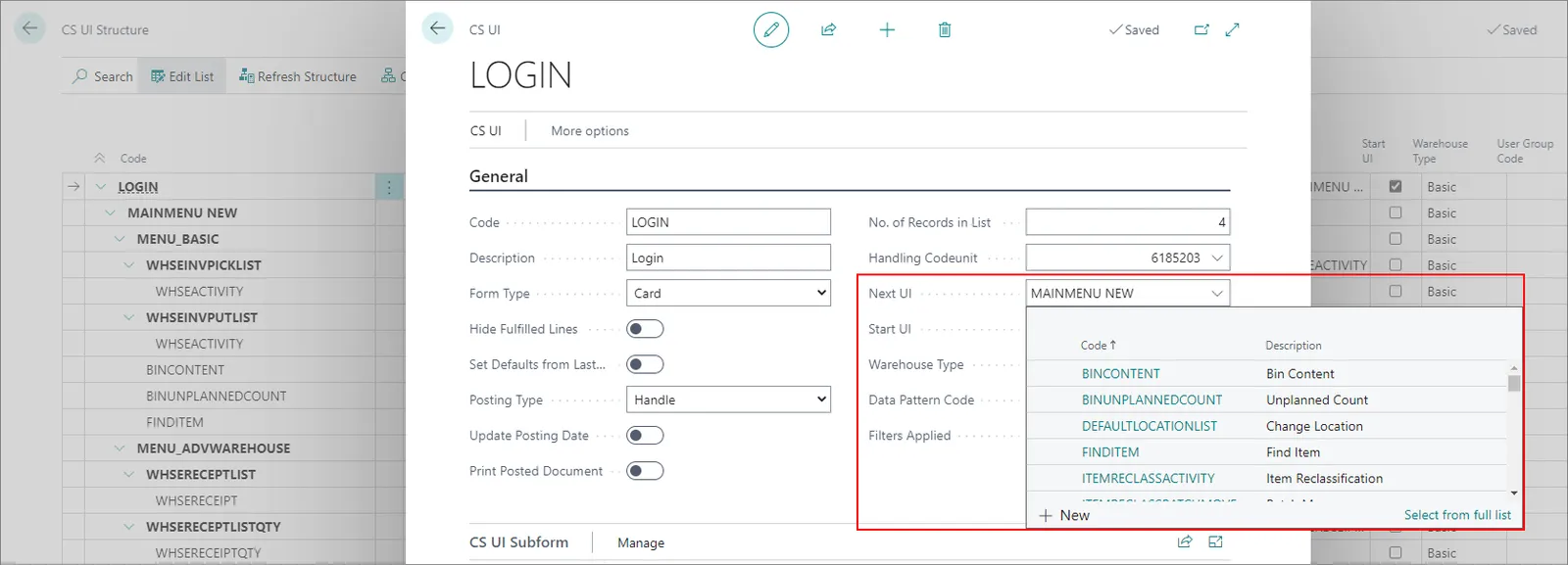
If you create a new CS UI, and you wish to apply it to the structure, you can do so by adding its CS UI code to the **Next UI** field.
Likewise, if you wish to remove a certain CS UI from the structure, you can do so by deleting the value from the **Next UI** field, and then clicking **Refresh Structure** in the **CS UI Structure** ribbon to see the changes.
> **Note:** Be careful when removing parent CS UIs from the structure. Always check whether you need some of its children CS UIs first.
#### See also
* [Set up Capture Service](/product/store-assistant-cs-setup)
* [Set up CS UIs](/product/store-assistant-cs-ui-setup)
* [Set up Capture Service users](/product/store-assistant-cs-user-setup)
* [Set up CS Data Patterns](/product/store-assistant-cs-data-pattern-setup)