> For clean Markdown of any page, append .md to the page URL.
> For a complete documentation index, see https://docs.navipartner.com/product/retail-vouchers-cashout/llms.txt.
> For AI client integration (Claude Code, Cursor, etc.), connect to the MCP server at https://docs.navipartner.com/_mcp/server.
# Cash out a voucher
> A customer can return a purchased voucher to the salesperson, and receive the cash back. They will be compensated in full as the result or reduced by the commission fee amount.
A customer can return a purchased voucher to the salesperson, and receive their cash back. They are either compensated in full as the result or with the reduction equal to the commission fee amount.
> **Note:** The voucher cash-out is performed with the POS action **CASHOUT\_VOUCHER**.
#### Prerequisite
* Attach the **CASHOUT\_VOUCHER** POS action to a [button](/product/retail-pos-layout-new-button) in the POS menu.\
The parameters set on this button determine if the commission fee will be charged and how it'll be posted.
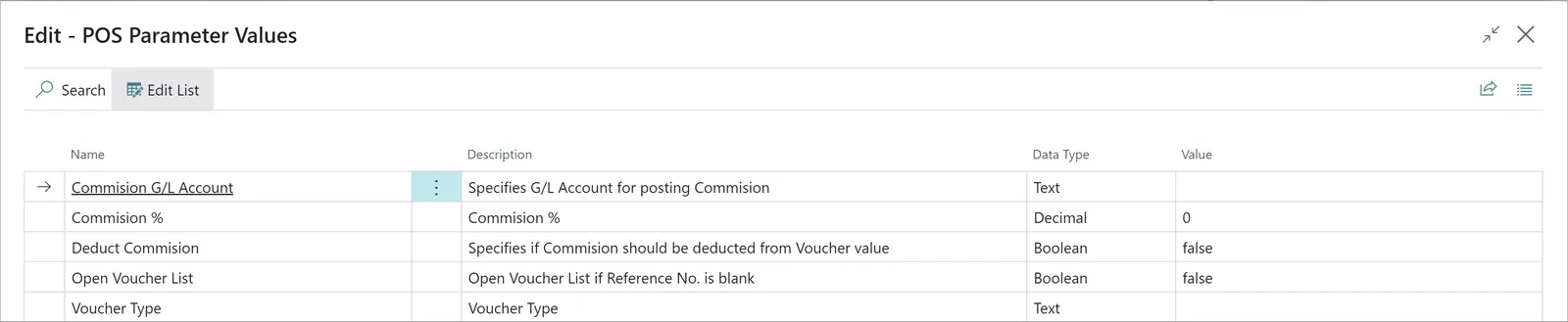
| Parameter Name | Description |
| -------------------------- | --------------------------------------------------------------------------------------------------------------------------------------------------------------------------------------------------------------- |
| **Commission G/L Account** | If the parameter **Deduct Commission** is set to **true**, this parameter needs to specify the G/L Account on which the commission will be posted. |
| **Commission %** | If the parameter **Deduct Commission** is set to **true**, this parameter needs to specify the commission percentage that will be applied on the voucher's value. |
| **Deduct Commission** | Specifies if the commission should be calculated and deducted from the voucher value. If it's set to **false**, the commission won't be charged, and the full voucher value will be suggested for the cash-out. |
| **Open Voucher List** | If it's set to **true**, and the **Reference No.** is left blank during the voucher cash-out, the **Voucher List** will be opened. |
| **Voucher Type** | Choose which voucher type will be used as a filter. If it isn't set, the **Voucher Type List** will be opened during the voucher cash-out. |
> **Note:** A run-time error will occur if **Deduct Commission** is enabled while the **Commission Account** or **Commission Percentage** are omitted.
#### Procedure
1. Open the POS, and press the button with the attached action.\
The window for the **Voucher Scanning** will pop up.
2. Provide the voucher's reference number in the pop-up.\
If the voucher is valid, a POS sale line is created for the commission, whereas a corresponding POS payment line is created for the voucher cash-out.
> **Note:** Voucher reference numbers can also be retrieved from the **Retail Vouchers** administrative section in Business Central.
3. Navigate to the payment and click **OK** to end the sale.\
The suggested amount is equal to the difference between the value of the voucher and the commission.
The voucher is archived as soon as the sale is finalized.
#### See also
* [Voucher types](/product/retail-vouchers-voucher-types)
* [Create a voucher on a sales order](/product/retail-vouchers-create-new-sales-order)
> Documentation for NaviPartner's NP Retail, NP Attractions, NP Hospitality, NP Store Assistant and Entria products, plus their REST APIs, built on Microsoft Dynamics 365 Business Central.