> This page is for Product Documentation.
> For clean Markdown of any page, append .md to the page URL.
> For a complete documentation index, see https://docs.navipartner.com/llms.txt.
> For AI client integration (Claude Code, Cursor, etc.), connect to the MCP server at https://docs.navipartner.com/_mcp/server.
# Variety values
> Learn what the Variety Values fields and options are used for.
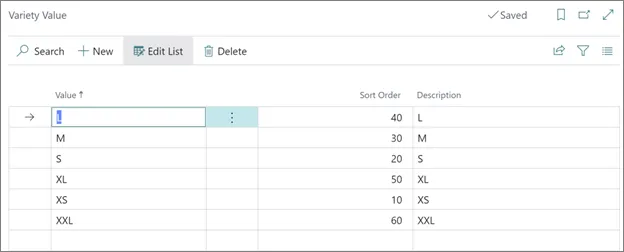
The following options are available when assigning values to varieties in the **Variety Value** administrative section:
| Field Name | Description |
| --------------- | -------------------------------------------------------------------- |
| **Value** | The value of the variety. |
| **Description** | Specifies additional information about a variety value. |
| **Sort Order** | Specifies the order in which the values are displayed in the matrix. |
#### See also
* [Set up variety matrix facilities on Sales Orders](/product/retail-varieties-matrix)
* [Create varieties in Business Central](/product/retail-varieties-create-variety)
* [Block a variant](/product/retail-varieties-block-variant)