> This page is for Product Documentation.
> For clean Markdown of any page, append .md to the page URL.
> For a complete documentation index, see https://docs.navipartner.com/llms.txt.
> For AI client integration (Claude Code, Cursor, etc.), connect to the MCP server at https://docs.navipartner.com/_mcp/server.
# Output Reimbursement Entries
> There are three types of Reimbursement Entries explained more in this article.
There are 3 types of Reimbursement Entries:
* **Data Collection** is created when the **Run Data Collection** action is triggered, and it contains certain data from Business Central. The **Show Source** action tab displays the data this entry is based on.
* **Manual Application** is used for removing single **Data Collection Entries** from an upcoming reimbursement. The manual applications can also be cancelled with the action **Cancel Manual Application**.
* The **Reimbursement** is created when the Run Reimbursement action is triggered, and it represents the **Final Result**.
In the provided screenshot a provision has been made, meaning the **Final Result** is a posting to G/L.
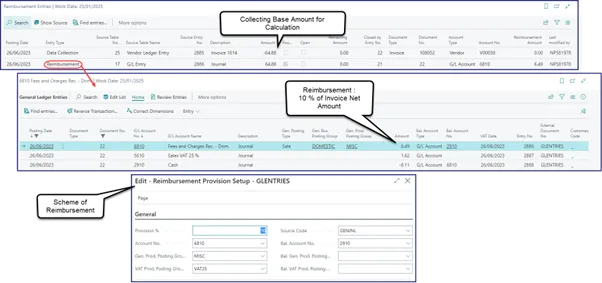
Running the **Data Collection** in the reimbursement, makes the module collect data according to different setups and calculate the reimbursement output.
A reimbursement can also be executed by **Task Queue NAS** by setting up a task on **Codeunit 6151106** **"NpRi Task Queue Mgt."**, and it has the following parameters:
* **RUN_DATA_COLLECTIONS**: Whether to run Data Collection.
* **RUN_REIMBURSEMENTS**: Whether to run Reimbursements.
#### See also
* [Process reimbursements](/product/retail-reimbursement-process)
* [Set up reimbursement party types](/product/retail-reimbursement-party-types)
* [Set up reimbursement templates](/product/retail-reimbursement-template-setup)