> This page is for Product Documentation.
> For clean Markdown of any page, append .md to the page URL.
> For a complete documentation index, see https://docs.navipartner.com/llms.txt.
> For AI client integration (Claude Code, Cursor, etc.), connect to the MCP server at https://docs.navipartner.com/_mcp/server.
# Configure a POS payment bin to open the cash register drawer with a print template
> To configure a payment bin to open the cash register drawer with a print template, follow the steps provided in this article.
To configure a payment bin to open the cash register drawer with a print template, make sure the prerequisites are met, and follow the provided steps:
#### Prerequisites
* Have a cash drawer connected to an Epson receipt printer.
* Have the **EPSON_CASH_DRAWER** [print template](/product/retail-printing-print-template-setup) set up.
* Have the **Print Template Output** configured so that a specified POS Unit prints this template with the local Epson printer.
* Have the **POS Payment Bin** created and attached to the **POS Unit**.
#### Procedure
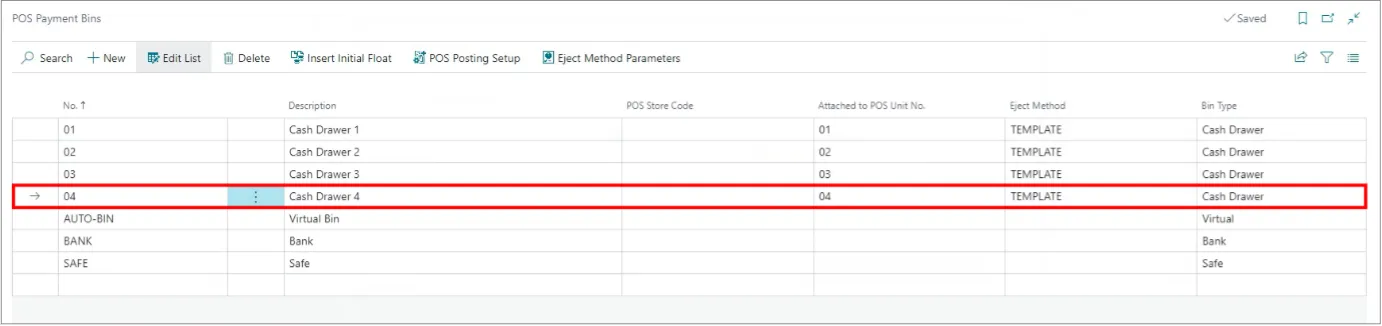
1. Navigate to the **POS Payment Bins** page in Business Central.
2. Select a payment bin from the list, and expand the options in the **Eject Method** column.\
A pop-up window is displayed.
3. Select **TEMPLATE** from the list.
4. With the same line still selected, click **Eject Method Parameters** in the ribbon.\
A POS **Payment Bin Eject Parameters** pop-up window is displayed.
5. Expand the options in the **Value** column.\
A **Print Template List** pop-up window is displayed.
6. Select **EPSON_CASH_DRAWER**.
#### See also
* [Printer troubleshooting](/product/troubleshooting-printer)
* [Printing overview](/product/retail-printing-intro)
* [Print properties](/product/retail-printing-print-properties)
* [Create a simple receipt/line print template](/product/retail-printing-receipt-print-template)
* [Set up coupon print templates](/product/retail-printing-create-print-template-coupon)