> This page is for Product Documentation.
> For clean Markdown of any page, append .md to the page URL.
> For a complete documentation index, see https://docs.navipartner.com/llms.txt.
> For AI client integration (Claude Code, Cursor, etc.), connect to the MCP server at https://docs.navipartner.com/_mcp/server.
# Different combinations and priority rules for posting
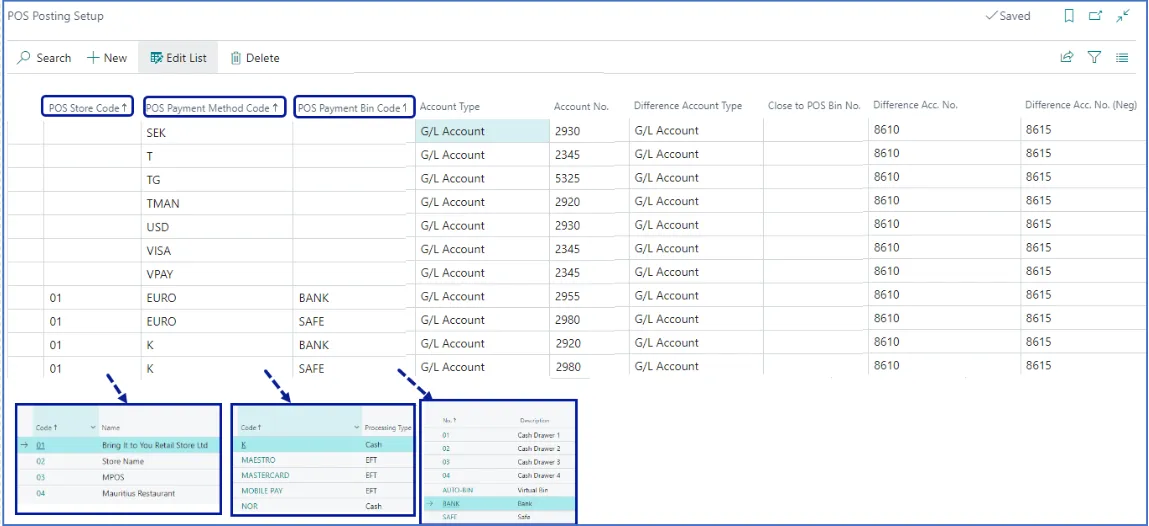
> The POS Posting Setup defines how the receipts for cash and other payment methods are posted in the General Ledger or Sub-Ledgers in the system.
The **POS Posting Setup** is used for posting the payment from the POS on a specific General Ledger account or a bank account. Different components of the **POS Posting Setup** have different priority levels determined by the [posting priority rules](/product/retail-posting-setup-posting-priority-rule).
The sales account is configured by combining the specified **Gen. Bus. Posting Group** and the **Gen. Prod. Posting Group** in the **POS Posting Setup** administrative section of Business Central. For that reason, you’ve configured the posting group **NATIONAL** in the **POS Posting Profile** and the **Gen. Prod. Posting Group** in the **Item Card** of each item.
Regardless of how it is set up, it’s necessary to consider the following elements:
* **POS Store Code**
* **POS Payment Method Code**
* **POS Payment Bin Code**
If there's one POS store, three POS units, and only one G/L account for the **CASH** (**K**) payment method, you can use the following combination in the setup:
| Store Code | Payment Method Code | Payment Bin Code | Account Type | Account No. | Difference Account Type | Difference Acc. No. | Difference Acc. No. (Neg) |
| ---------- | ------------------- | ---------------- | ------------ | ----------- | ----------------------- | ------------------- | ------------------------- |
| | CASH | | G/L Account | 230450 | G/L Account | 720700 | 720700 |
If there are three POS stores, three POS units, and each of the stores is linked to a different G/L account for the **CASH** (**K**) payment method, it is recommended to perform the following setup, and achieve a [full match](/product/retail-posting-setup-posting-priority-rule):
| Store Code | Payment Method Code | Payment Bin Code | Account Type | Account No. | Difference Account Type | Difference Acc. No. | Difference Acc. No. (Neg) |
| ---------- | ------------------- | ---------------- | ------------ | ----------- | ----------------------- | ------------------- | ------------------------- |
| **STORE1** | CASH | REG1 | G/L Account | 230450 | G/L Account | 720700 | 720700 |
| **STORE2** | CASH | REG2 | G/L Account | 230451 | G/L Account | 720700 | 720700 |
| **STORE3** | CASH | REG3 | G/L Account | 230452 | G/L Account | 720700 | 720700 |
If there's a single POS store, three POS units, and one G/L account for the **CASH** (**K**) payment method, it's recommended to set up the [full match with the **POS Store Code**, the **POS Payment Method Code**, and the **POS Payment Bin Code**](/product/retail-posting-setup-posting-priority-rule):
| Store Code | Payment Method Code | Payment Bin Code | Account Type | Account No. | Difference Account Type | Difference Acc. No. | Difference Acc. No. (Neg) |
| ---------- | ------------------- | ---------------- | ------------ | ----------- | ----------------------- | ------------------- | ------------------------- |
| **STORE1** | CASH | REG1 | G/L Account | 230430 | G/L Account | 720700 | 720700 |
| **STORE1** | CASH | REG2 | G/L Account | 230440 | G/L Account | 720700 | 720700 |
| **STORE1** | CASH | REG3 | G/L Account | 230450 | G/L Account | 720700 | 720700 |
If there's one POS store, three POS units, and one G/L account for the **CASH** (**K**) payment method, and each of the stores is linked to a different G/L account for the **CASH** (**K**) payment method, you can either go for a [full match, or set one constraint for the **POS Payment Method Code**](/product/retail-posting-setup-posting-priority-rule):
| Store Code | Payment Method Code | Payment Bin Code | Account Type | Account No. | Difference Account Type | Difference Acc. No. | Difference Acc. No. (Neg) |
| ---------- | ------------------- | ---------------- | ------------ | ----------- | ----------------------- | ------------------- | ------------------------- |
| **STORE1** | CASH | REG1 | G/L Account | 230490 | G/L Account | 720700 | 720700 |
| **STORE1** | CASH | REG2 | G/L Account | 230490 | G/L Account | 720700 | 720700 |
| **STORE1** | CASH | REG3 | G/L Account | 230490 | G/L Account | 720700 | 720700 |
| Store Code | Payment Method Code | Payment Bin Code | Account Type | Account No. | Difference Account Type | Difference Acc. No. | Difference Acc. No. (Neg) |
| ---------- | ------------------- | ---------------- | ------------ | ----------- | ----------------------- | ------------------- | ------------------------- |
| | **CASH** | | G/L Account | 230490 | G/L Account | 720700 | 720700 |
The posting setup is flexible, and it's up to you to define the best fit for your clients' requirements.
## Common combinations in POS Posting Setup (Cash)
This example showcases what occurs when closing the register and how the system generates proper journal entries based on the POS Posting Setup.
| Store Code | Payment Method Code | Payment Bin Code | Account Type | Account No. | Difference Account Type | Difference Acc. No. | Difference Acc. No. (Neg) |
| ---------- | ------------------- | ---------------- | ------------ | ----------- | ----------------------- | ------------------- | ------------------------- |
| | CASH | | G/L Account | 230430 | G/L Account | 720700 | 720700 |
| **STORE1** | CASH | BANK | G/L Account | 230440 | G/L Account | 720700 | 720700 |
| **STORE1** | CASH | SAFE | G/L Account | 230450 | G/L Account | 720700 | 720700 |
When you receive a payment in **CASH**, the G/L account **230430** is debited with that amount.
When balancing is done, if there is a difference between the physical cash count and the register amount, the difference is recorded in the account **720700**.
After the cash balancing is done, and you decide you wish to transfer some money into a **BANK** (or a **BANK Intermediary Account**), the account **230440** will be debited and the account **230430** will be credited with the transferred amount.
After the cash balancing is done, and you decide to transfer some money into a **SAFE**, the account **230450** will be debited and the account **230430** is credited with the transferred amount.
### Related links
* [POS posting setup](/product/retail-posting-setup-pos-posting-setup)
* [Posting priority rules](/product/retail-posting-setup-posting-priority-rule)
* [POS Posting Setup troubleshooting](/product/troubleshooting-pos-posting-setup)