> This page is for Product Documentation.
> For clean Markdown of any page, append .md to the page URL.
> For a complete documentation index, see https://docs.navipartner.com/llms.txt.
> For AI client integration (Claude Code, Cursor, etc.), connect to the MCP server at https://docs.navipartner.com/_mcp/server.
# Coupon types
> Refer to the tables with descriptions of dedicated Coupon Type Setup fields.
The **Coupon Type Card** gives you the option to create a setup for coupons. It has four sections: **General**, **Issue Coupon**, **Validate Coupon** and **Apply Discount**.
In the **General** section the following fields can be defined:
| Field Name | Description |
| ------------------------ | -------------------------------------------------------------------------------------------------------------------------------------- |
| **Code** | The unique code for coupon. |
| **Description** | The short description of a coupon. |
| **Discount Type** | You can choose between two methods of conveying discounts - **Discount amount** or **Discount %**. |
| **Discount Amount** | The amount that will be on the coupon. |
| **Discount %** | The discount percentage that the customer gets with the coupon. |
| **Max. Discount Amount** | The maximum amount on which the discount will be calculated. |
| **POS Store Group** | The group of stores in which the coupon can be used. If this field is left blank, it will be possible to use the coupon in all stores. |
| **Coupon Qty. (Open)** | The number of open coupons. |
| **Arch. Coupon Qty.** | The number of archived coupons. |
| **Enabled** | If the coupon type is in use, this field should be checked. |
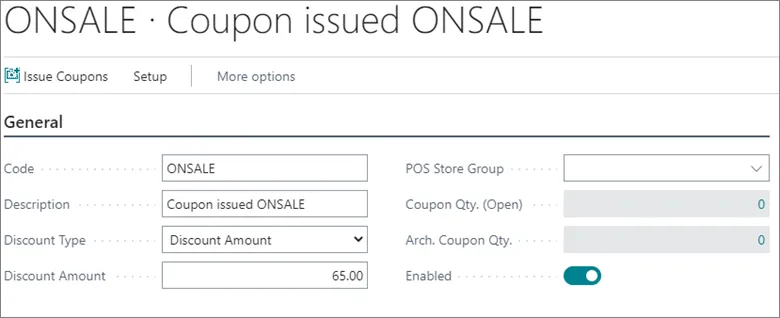
For example, the coupon from the screenshot above will give a discount amount of 65 to the customer and it is possible to apply it in all stores.
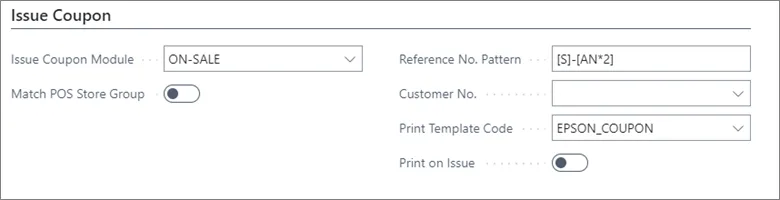
In the **Issue Coupon** section you can define how the coupon will be issued:
| Field Name | Description |
| ------------------------- | -------------------------------------------------------------------------------------------------------------------------------------------------------------------------------------------------------------------------------------------------------------------------------------------------------- |
| **Issue Coupon Module** | You can choose between three options: **DEFAULT** - the coupon is issued manually from Business Central or from the POS (after the button is created); **ON-SALE** - the coupon is created during a sale in the POS; **MEMBER-LOYALTY** - the coupon is created when a member has enough points for it. |
| **Match POS Store Group** | If a coupon created ON-SALE in one store can be used just in that store, you need to assign the **POS Store Group** in the **General** section, and to check this field. In this way, the coupons ON-SALE will be issued only in stores from the POS store group assigned. |
| **Reference No. Pattern** | The pattern used to create the coupon external number, which will later be scanned. |
| **Customer No.** | The number used for making the coupon tracking easier for a customer. |
| **Print Template Code** | Template which will be printed for the coupon. |
| **Print on Issue** | If this field is checked, the coupon will be printed. |
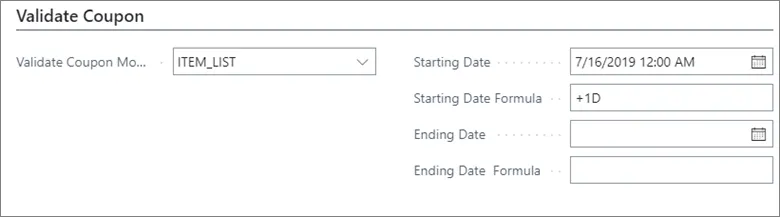
In the section **Validate Coupon** you can define which parameters need to be validated when the coupon is redeemed:
| Field Name | Description |
| -------------------------- | ---------------------------------------------------------------------------------------------------------------------------------------------------------------------------------------------------------------------------------------------------------------------------------------------------------------------------------------------------------------- |
| **Validate Coupon Module** | You can choose between three options for coupon validation: **DEFAULT** - the store, the date, and the reference number; **ITEM_LIST** - the store, the date, the reference number, and the items set in **Setup** > **Setup Validate coupon**; **TIME** - the store, the date, the reference number, and the time set in **Setup** > **Setup Validate coupon**. |
| **Starting Date** | The date from which the coupon becomes valid. |
| **Ending Date** | The date until which the coupon is valid. |
| **Starting Date Formula** | The formula which calculates the date from which the coupon becomes valid. |
| **Ending Date Formula** | The formula which calculates the date until which the coupon is valid. |
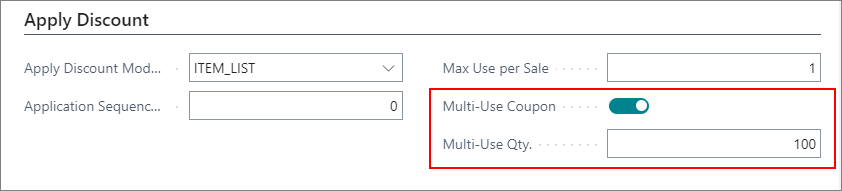
In the section **Apply Discount** you can define how the discount will be applied.
| Field Name | Description |
| ------------------------- | --------------------------------------------------------------------------------------------------------------------------------------------------------------------------------------------------------------------------------------------------------------------------------------------------------------------------------------------------------------------------------------------------------- |
| **Apply Discount Module** | You can choose between three options: **DEFAULT** - The discount will be given according to the settings on the coupon; **ITEM_LIST** – The discount will be given according to the settings set on the **Items** list; **EXTRA_ITEM** – The discount will be added to the specific item selected in **Setup** > **Setup Apply Discount**, the item will also be added to the POS when coupon is scanned. |
| **Max Use per Sale** | The maximum number of uses per sale. |
| **Multi-Use Coupon** | If the coupon can be used more than once this field needs to be checked. |
| **Multi-Use Qty.** | The number of times a customer is allowed to use the coupon. |
#### See also
* [Coupon troubleshooting](/product/troubleshooting-coupon)
* [Discount types](/product/retail-discounts-discount-types)
* [Discount coupon setup](/product/retail-coupons-discount-coupon-usecases)
* [Create a new coupon](/product/retail-coupons-new-coupon)
* [Create and set up activity coupons](/product/retail-coupons-activity-coupons)