> This page is for Product Documentation.
> For clean Markdown of any page, append .md to the page URL.
> For a complete documentation index, see https://docs.navipartner.com/llms.txt.
> For AI client integration (Claude Code, Cursor, etc.), connect to the MCP server at https://docs.navipartner.com/_mcp/server.
# Set up Shopify integration in NaviPartner
> Refer to this article if you wish to set up the Shopify integration in NP Retail.
To set up the Shopify integration, make sure the prerequisites are met, and follow the provided steps:
### Prerequisites
1. Install the NP Retail application on the customer tenant database.\
The application's version needs to be xxxx.42.0.10000 or newer.
2. Make sure a [custom app is registered](/product/ecommerce-shopify-register-shopify-custom-app) with Shopify.
> **Note:** If you plan to use the retail voucher integration (Shopify Gift Cards) and want to support partial redemption of gift cards, you need to have a Shopify Plus subscription.
### Procedure
1. Search for **NaviPartner Feature Management** and select the related link.
2. Enable the **Shopify Integration** feature.
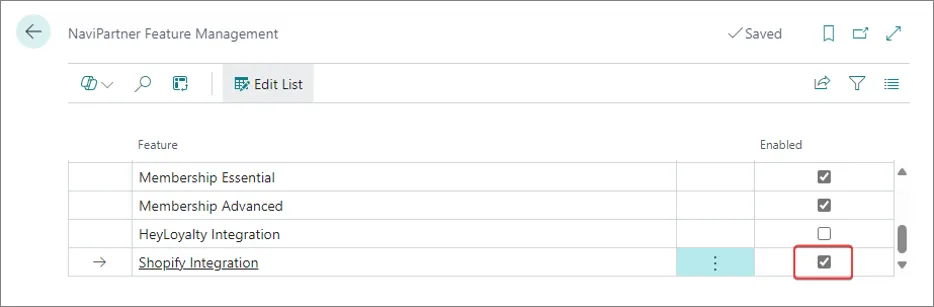
3. Search for **Shopify Integration Setup** and select the related link.
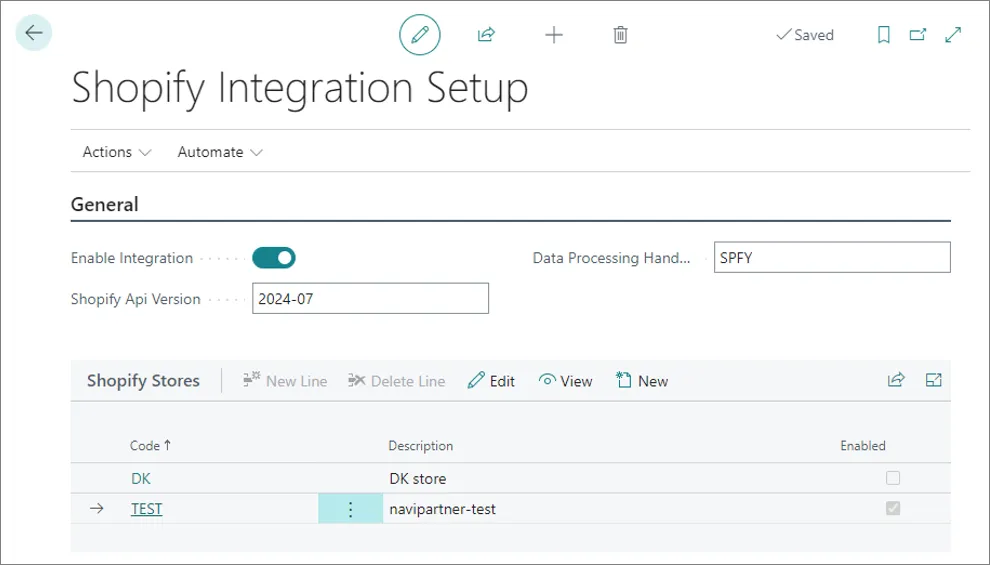
4. Enable the integration, choose which version of Spotify API you wish to use, and set up the Shopify stores you want to integrate with.\
Check the provided screenshot and table with the available fields and options.
| Field name | Description |
| ------------------------------ | --------------------------------------------------------------------------------------------------------------------------------------------------- |
| **Enable Integration** | Specifies whether the integration is enabled or not. This is the master on/off switch for the integration. |
| **Shopify API Version** | Specifies the Shopify API version that Business Central will use to communicate with Shopify. The default value is "2024-07". |
| **Data Processing Handler ID** | Specifies a code used by the system to identify the import types, task processor, and data log subscribers associated with the Shopify integration. |
> **Warning:** Whenever you make changes on this page, you and other environment users need to log into Business Central again for the changes to take effect.
## Next steps
* [Create a Shopify store](/product/ecommerce-shopify-shopify-store)