> This page is for Product Documentation.
> For clean Markdown of any page, append .md to the page URL.
> For a complete documentation index, see https://docs.navipartner.com/llms.txt.
> For AI client integration (Claude Code, Cursor, etc.), connect to the MCP server at https://docs.navipartner.com/_mcp/server.
# Set up inventory-specific integration areas
> Each Business Central location for which you want to send available inventory to Shopify needs to be associated with a Shopify location.
> **Note:** At least one location needs to be set up in your Business Central company.
You can link any number of Business Central locations to a single Shopify location, and any number of Shopify locations to a single Business Central location.
* If you link more than one Business Central location to a Shopify location, the available-to-sell inventory sent to the Shopify location will be a sum of the availabilities from all the linked Business Central locations.
* If you link more than one Shopify location to a single Business Central location, Business Central will update the item availability on all linked Shopify locations with the same quantity taken from the Business Central location.
To link a Shopify location to a location in Business Central, follow the provided steps:
1. Search for **Locations** and select the related link.
2. Open the desired **Location Card**.
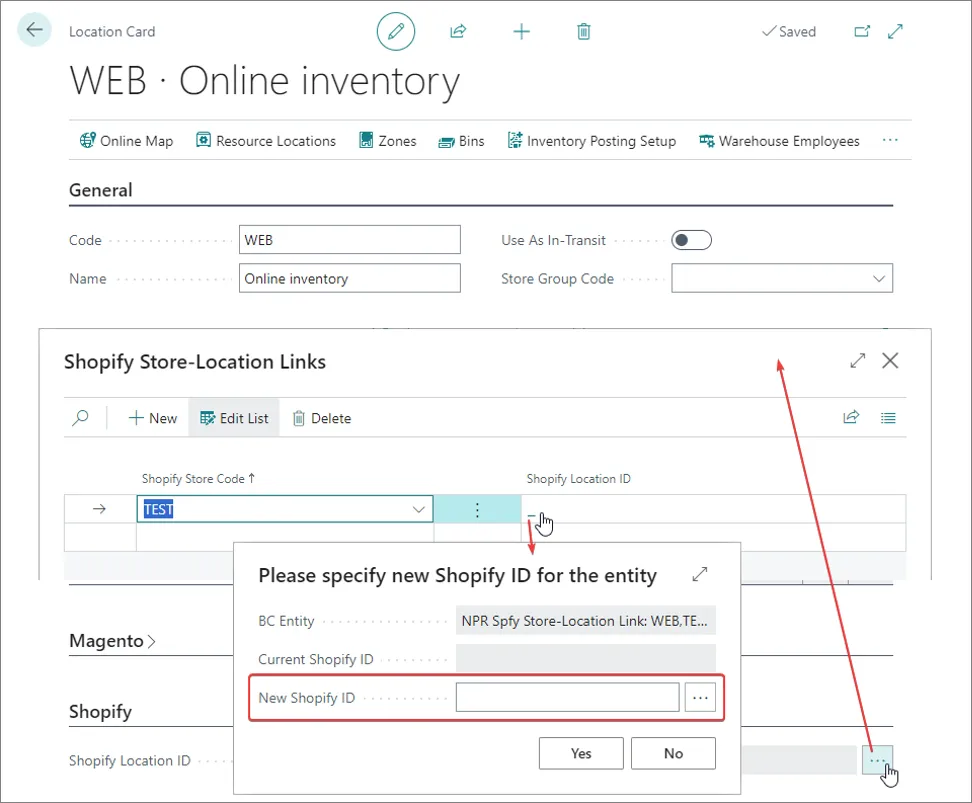
3. Click the **...** option next to **Shopify Location ID**.\
The **Shopify Store-Location Links** page is opened.
4. Map the Shopify locations to the Business Central location from which you've opened the page.
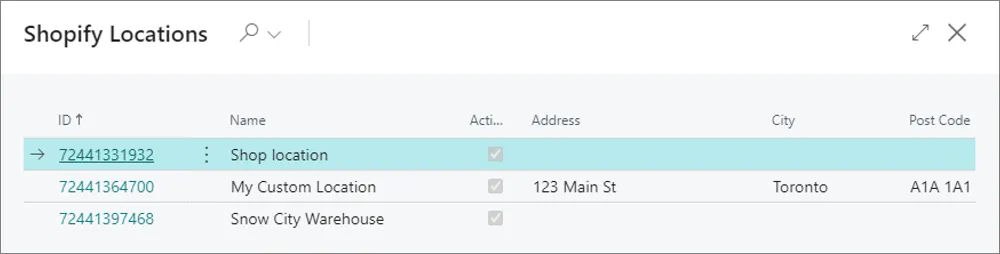
If you've [already set up your connection parameters in the **Shopify Store** administrative section](/product/ecommerce-shopify-shopify-store), the system will be able to connect to the Shopify environment you've set up the connection to, and display a list of available Shopify locations for you to choose from.
## Next steps
* [Set up Sales Order integration area](/product/ecommerce-shopify-sales-order-setup)