> This page is for Product Documentation.
> For clean Markdown of any page, append .md to the page URL.
> For a complete documentation index, see https://docs.navipartner.com/llms.txt.
> For AI client integration (Claude Code, Cursor, etc.), connect to the MCP server at https://docs.navipartner.com/_mcp/server.
# Set up Adyen payment integration
> Refer to this article if you wish to set up the Adyen payment integration in NP Retail.
To set up the Adyen online payment gateway integration in Business Central, make sure the prerequisites are met, and follow the provided steps:
## Prerequisite
* Create an API key for Adyen.\
To allow Business Central to interact with Adyen's API it requires a set of access credentials. The integration uses basic authentication
and therefore requires a **username** and a **password**. Please follow Adyen's documentation on how to [generate a basic authentication password](https://docs.adyen.com/development-resources/api-credentials#basic-authentication).
> **Warning:** Ensure that the webservice user is enabled and has the both the **Merchant PAL webservice** role and the **Checkout webservice** role enabled.
> **Note:** It's recommended to create a new user which will not interfere with any other integrations.
## Procedure in Business Central
1. Search for **Payment Gateways**, and select the related link.
2. Click **New** to create a code for Adyen.
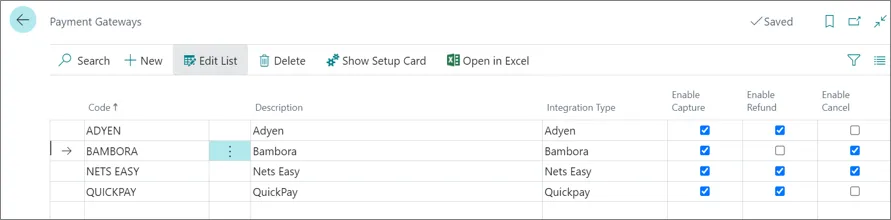
> **Note:** Depending the required setup, the options to enable **Capture**, **Refund** and **Cancel** need to be flagged as illustrated in the screenshot above.
3. Click **Show Setup Card** to update the fields listed below:
* **Merchant Name** - The name of your merchant with Adyen.
* **Environment** - You can choose either the **Test** or the **Production** environment.
* **API URL Prefix** - The URL prefix for your live Adyen account.\
Follow [the guide on finding the endpoint URL for the live account](https://help.adyen.com/knowledge/ecommerce-integrations/integrations-basics/how-can-i-find-the-endpoint-url-for-my-live-account) to find this value. This configuration is only required if **Environment** is set to **Production**.
* **API Username** - The **username** obtained during the API credential generation.
* **API Password** - The **password** obtained during the API credential generation.