> This page is for Product Documentation.
> For clean Markdown of any page, append .md to the page URL.
> For a complete documentation index, see https://docs.navipartner.com/llms.txt.
> For AI client integration (Claude Code, Cursor, etc.), connect to the MCP server at https://docs.navipartner.com/_mcp/server.
# Loyalty overview
> The loyalty program is a popular marketing tool used to reward loyal customers. The principle is that a customer is awarded points based on certain purchase actions, and these points are then consumed by being converted into discounts.
In this way customers are encouraged to make new sales and accumulate points which will enable usage of discounts.
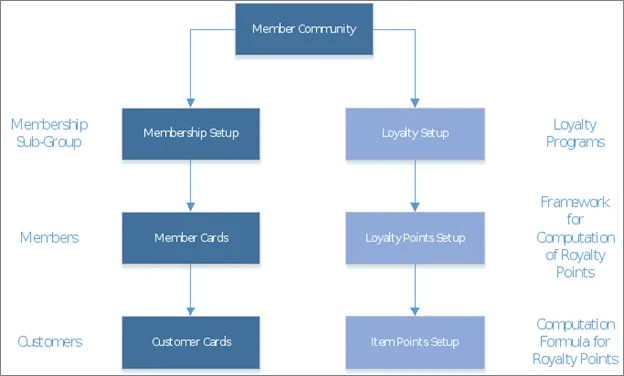
The loyalty program in NP Attraction is created as a part of the [Membership Module](/product/Attraction-membership-membership-setup). As the loyalty program is intended for a specific group of customers (loyal customers), it is important to identify those groups as memberships, and to create members and customers as individuals which will accumulate points and benefit from the program.
* For members to be eligible for accumulating points, the conditions under which the points will be generated need to be set in the **Loyalty Setup** and **Item Points Setup**.
* For members to be able to benefit from the program the conditions under which the points will be used must be set in the **Loyalty Points Setup**.
The relation between setups is illustrated in the provided image:
#### See also
* [Set up the loyalty program](/product/shipping-labels-shipmondo-setup)
* [Redeem_points on sale](/product/Attraction-loyalty-redeem-points)
* [Assign points on sale](/product/Attraction-loyalty-assign-points)
* [Navigation and reports](/product/Attraction-loyalty-navigation-reports)