> This page is for Product Documentation.
> For clean Markdown of any page, append .md to the page URL.
> For a complete documentation index, see https://docs.navipartner.com/llms.txt.
> For AI client integration (Claude Code, Cursor, etc.), connect to the MCP server at https://docs.navipartner.com/_mcp/server.
# Assign points on sale
> After the members and loyalty setups are created, points can be assigned to a customer on sale. Refer to this guide to learn more.
After the members and loyalty setups are created, points can be assigned to a customer on sale. The main thing about assigning points on sale to members is to scan the member card (choose a member on the POS).
To assign the points on sale:
1. Click the **Scan Member Card** button.
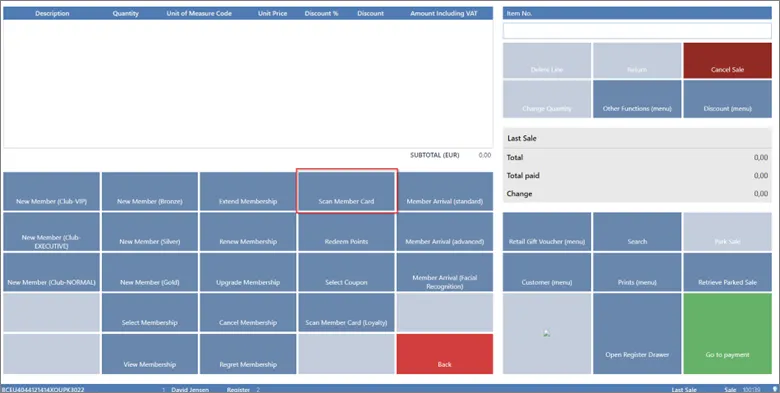
2. Enter the number of the card which can be found in the **Member Card** page.
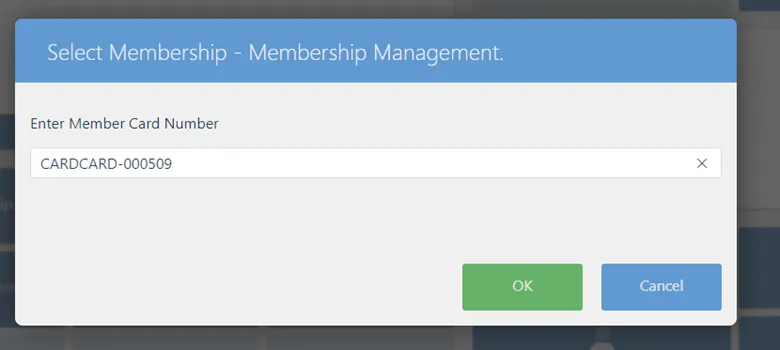
After the card is scanned, the member will be assigned to the sale, and then they can start accumulating points. The sale itself is performed like any other. Select items the customer wants to buy and finalize the sale with payment.
## Example
If a customer has bought an item with the price of 49 EUR, and in **Loyalty Setup** we set that for every EUR spent the customer will receive 1 point, in the **Membership Card** after the sale is complete, the points will be displayed in the **Membership Point Entry** tab:

If, instead of loyalty setup for assigning points the item point setup is used, and only some items bring points to the customer, the sales consisting of other items will not provide any points.
#### See also
* [Set up the loyalty program](/product/shipping-labels-shipmondo-setup)
* [Redeem_points on sale](/product/Attraction-loyalty-redeem-points)
* [Assign points on sale](/product/Attraction-loyalty-assign-points)
* [Navigation and reports](/product/Attraction-loyalty-navigation-reports)